AI Image Tool

Grok Image 2.0– AI Image Generator

Create, edit, and refine images with Grok Imagine Image 2.0.

AI Image Generator

Sign in with Google to turn your idea into an original image. Every account can create one free image each day.

More generation options are coming. Additional generation choices will be added in the future. Check back soon for updates.
Sign in to check generation access. Daily generation status will appear here.

Turn a simple idea into an image with AI. Create realistic photos, illustrations, product visuals, social media graphics, characters, and more. You can also upload images and describe the changes you want in plain language.

Create Images with Grok Image 2.0 From Your Ideas

You don't need to know complicated image-editing software or write a perfect prompt.

Tell Grok what you want to see, and it can turn your description into an image.

You can describe the subject, scene, lighting, composition, colors, mood, and style in your own words.

For example:

A cinematic photo of a red sports car driving through Tokyo at night, wet streets, neon reflections, realistic photography.

From realistic photography to illustrations, concept art, product visuals, and marketing graphics, Grok Image is built to handle different creative directions.

How to Use Grok Image

Describe

Write what you want to create.

Add a Reference

Upload an image if you want Grok to follow an existing subject, product, character, or visual direction.

Generate

Let Grok turn your prompt and references into a new image.

Refine

Not quite right? Tell Grok what to change and generate another version.

Your idea → Prompt → Reference → Generate → Refine
Capabilities

4 Things That Make Grok Image Useful

Follow Detailed Prompts More control over what you create.

Grok Image 2.0 can follow detailed instructions about the subject, composition, lighting, colors, layout, and style.

Describe the important details in your prompt instead of settling for a generic result. This is especially useful for posters, product visuals, advertisements, and other images with multiple elements.

Grok Image detailed prompt following example

Edit With Natural Language Change an image by simply telling Grok what to do.

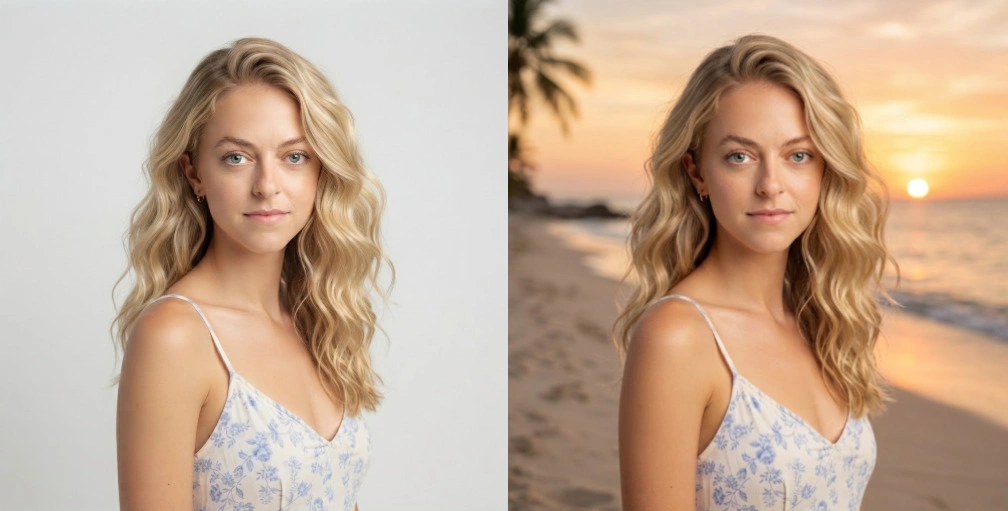
You can ask Grok to replace a background, remove an object, change the lighting, or restyle an image without starting from scratch.

For example: “Replace the background with a sunset beach while keeping the person unchanged.”

Grok Image natural language editing example

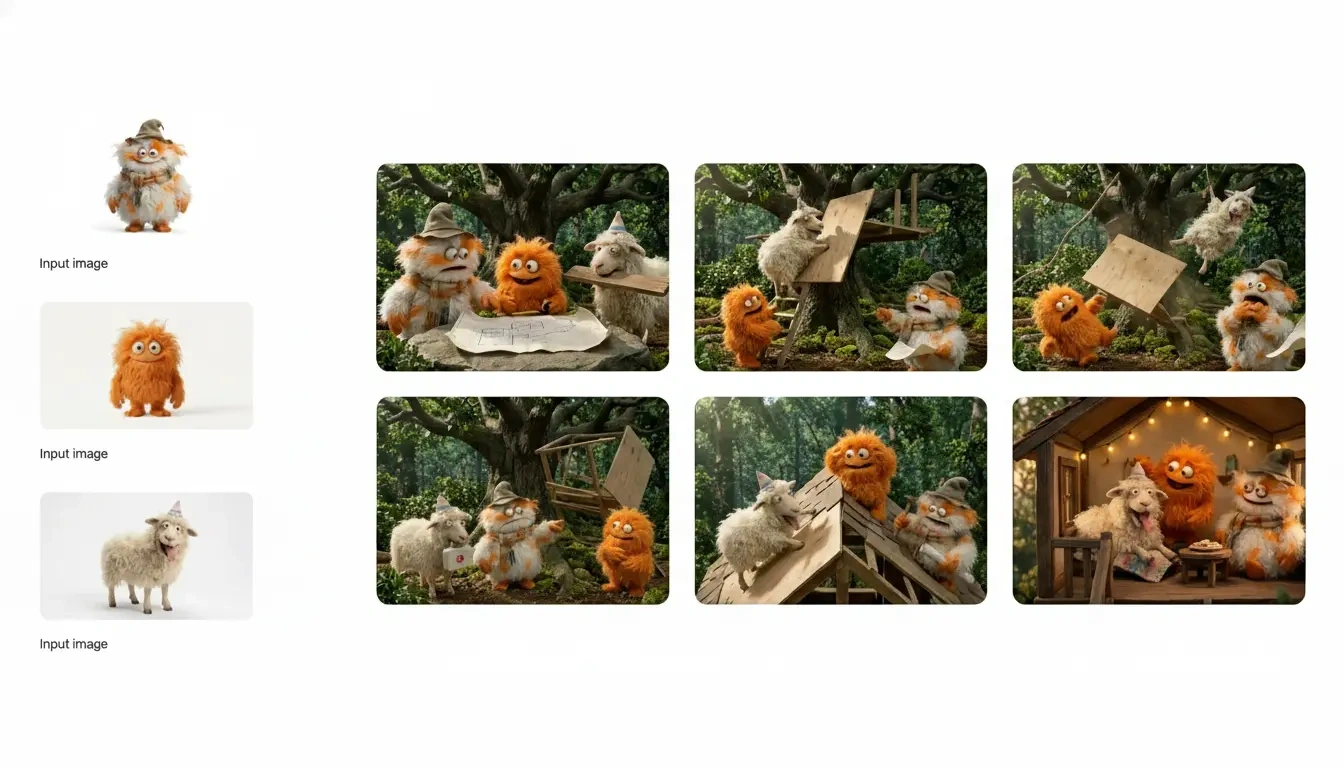
Work With Multiple References Bring different visual ideas into one image.

Grok Image 2.0 supports up to five reference images for image editing. Use them to provide different subjects, products, outfits, environments, or other visual details.

Instead of explaining everything with words, give Grok the images that show what you mean.

Best for: Characters, products, styles, visual references

Grok Image multiple reference image example

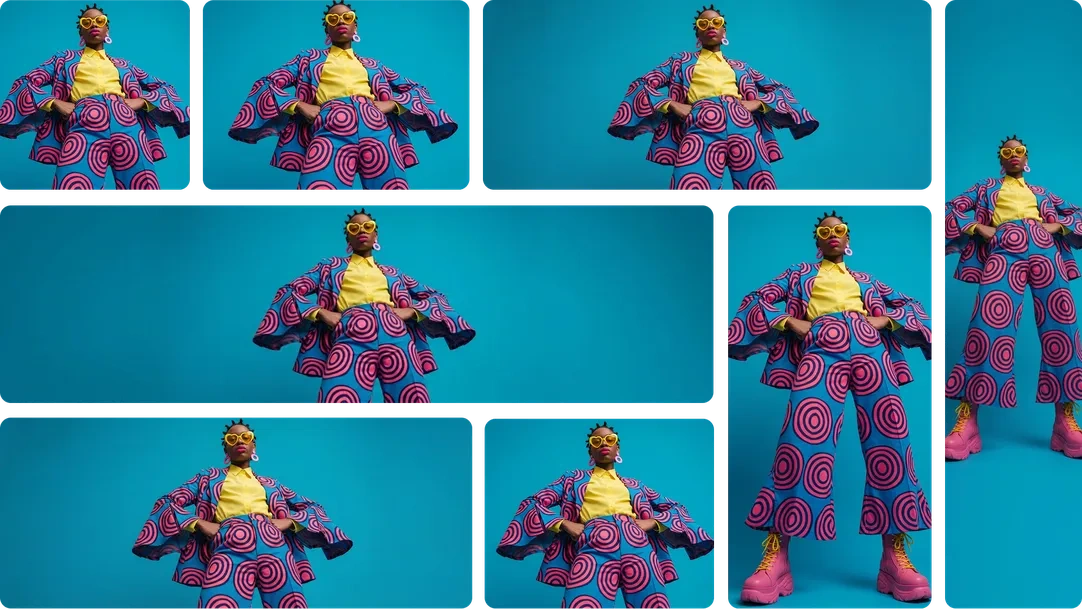
Choose the Right Format Create images for different types of content.

Grok Image 2.0 supports multiple aspect ratios, from square and vertical images to wide cinematic formats such as 21:9 and 5:2.

It also supports 1K and 2K output, giving you more flexibility for social posts, wallpapers, website banners, and other creative projects.

Best for: Social media, banners, wallpapers, wide visuals

Grok Image aspect ratio and output format example

What Can You Create with Grok Image 2.0?

  • Product Images

    Create product scenes, lifestyle shots, advertising concepts, and new backgrounds without setting up a physical shoot.

  • Social Media Graphics

    Create visuals for posts, thumbnails, banners, and other social content.

  • Realistic Photography

    Generate portraits, landscapes, street scenes, food photography, and cinematic shots.

  • Illustrations & Artwork

    Explore illustration styles, concept art, fantasy scenes, and creative ideas.

  • Characters & Creative Concepts

    Create character concepts, environments, costumes, and visual references for games or stories.

  • Posters & Marketing Visuals

    Create promotional graphics, campaign concepts, event posters, and landing-page visuals.

FAQ

Can Grok Image edit existing images?

Yes. You can provide an image and use natural-language instructions to change its background, style, composition, or other visual elements.

How many reference images can I use?

The current Image 2.0 image-editing API supports up to five source images per request.

Can I generate realistic images?

Yes. Grok Imagine supports different visual styles, including realistic photography, illustrations, anime-style visuals, oil-painting looks, and pencil sketches.

What image sizes does Grok Image support?

Image 2.0 supports 1K and 2K output, with multiple aspect ratios for different creative uses.

Sign in to Nano Banana Pro

Sign in with Google to generate images and keep your creation history on this device.